Quickstart
import json
import httplib
import numpy
from pydvid import voxels, general

# Open a connection to DVID
connection = httplib.HTTPConnection( "localhost:8000", timeout=5.0 )

# Get detailed dataset info: /api/datasets/info
dataset_details = general.get_repos_info( connection )
print json.dumps( dataset_details, indent=4 )

# Create a new remote volume
uuid = 'abcde'
voxels_metadata = voxels.VoxelsMetadata.create_default_metadata( (4,0,0,0), numpy.uint8, 'cxyz', 1.0, "" )
voxels.create_new( connection, uuid, "my_volume", voxels_metadata )

# Use the VoxelsAccessor convenience class to manipulate a particular data volume
dvid_volume = voxels.VoxelsAccessor( connection, uuid, "my_volume" )
print dvid_volume.axiskeys, dvid_volume.dtype, dvid_volume.minindex, dvid_volume.shape

# Add some data
updated_data = numpy.ones( (4,100,100,100), dtype=numpy.uint8 ) # Must include all channels.
dvid_volume[:, 10:110, 20:120, 30:130] = updated_data
# OR:
dvid_volume.post_ndarray( (0,10,20,30), (4,110,120,130), updated_data )

# Read from it (First axis is channel.)
cutout_array = dvid_volume[:, 10:110, 20:120, 30:130]
# OR:
cutout_array = dvid_volume.get_ndarray( (0,10,20,30), (4,110,120,130) )

assert isinstance(cutout_array, numpy.ndarray)
assert cutout_array.shape == (4,100,100,100)
Please see the pydvid.voxels.VoxelsAccessor documentation for more details regarding permitted slicing syntax.
Why should I use pydvid?
For simple use-cases, it is feasible to access the DVID REST API directly. But pydvid offers the following advantages over direct access to the DVID API:
numpy-like access to ND data volumes:
- familiar slicing syntax for read/write
- DVID concepts mapped to numpy concepts: multi-channel array with numpy.dtype
Efficient (streaming) encoding/transmission of large volumes
Automatic retry when get/post is rejected due to DVID ‘busy’ state
JSON schema validation facilities
Convenience utilities for creating new DVID datasets
Lots of error checking for common mistakes
- Detailed error messages when something goes wrong
Shared code base: If we all use pydvid, then we can update our code in one place as the DVID API expands and evolves. If there’s something you don’t like about pydvid, open a new issue on the github issue tracker, or (better yet) submit a pull request!
A note about data axes
pydvid gives you ND-data as a numpy.ndarray. We use the same axis order convention that DVID uses (Fortran order). In the DVID API, channel (i.e. ‘Values’ in DVID terminology) is not considered a separate array axis. However, in pydvid, a separate axis is always used to represent the channel, even for arrays with only a single channel. The channel axis is always in the first slicing position.
For example: DVID considers a 3D grayscale8 volume of size (80,90,100) to have 3 axes (say, "X", "Y", "Z"), but pydvid will give you a 4D array of shape (1,80,90,100), indexed by my_array[c,x,y,z]. Again, note that the first axis is always 'c' (channel) for all nd-arrays returned by pydvid.
Notes about the coordinate system
DVID uses a signed coordinate system, but pydvid does not yet support signed coordinates. If you need to access a region below the (0,0) coordinate, you’re out of luck.
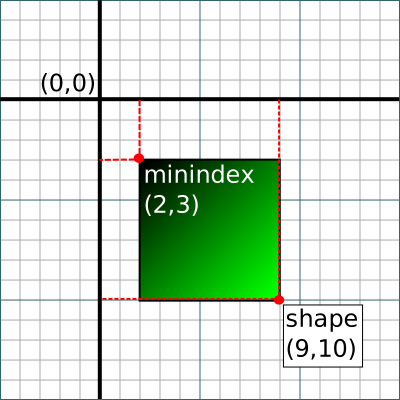
Otherwise, pydvid uses the same coordinate system as DVID, regardless of which voxels contain valid data. The VoxelsAccessor.shape attribute represents the upper extent of the volume stored in DVID, and the VoxelsAccessor.minindex attribute represents the lower extent of the stored data. Attempting to read data above or below those two extents may result in error.
For example, for the volume shown in the diagram below, you could access the entire stored volume as follows:
dvid_volume = voxels.VoxelsAccessor( connection, uuid, "my_volume" )

# Retrieve all stored voxels
start, stop = dvid_volume.minindex, dvid_volume.shape
cutout_array = dvid_volume.get_ndarray( start, stop )

# Note the shape of the result
assert (cutout_array.shape == numpy.array(start) - stop).all()
Roadmap
pydvid is pretty small right now, but we hope it will gracefully absorb more functionality:
- Pooled connections for clients who don’t want to manage their own connections
- Access DVID data via other message types (e.g. PNG, JPEG, etc.)
- Sparse volume access
- Stricter JSON schema validation
- Testing against an actual DVID server instead of relying on the builtin mock server
- Support signed (negative) coordinates